Dynamic Gesture Asset

DynamicGestureAsset defines the behavior and integration of a custom hand gesture used by the Dynamic Gesture system.
Once created, assign the asset to a Dynamic Gesture component to make the gesture available on the avatar.
Properties
Section titled “Properties”GestureName
Section titled “GestureName”The display name of the gesture shown in the VRChat expression menu.
GestureIcon
Section titled “GestureIcon”The icon shown alongside the gesture in the VRChat expression menu.
MotionType
Section titled “MotionType”Defines how the assigned animation responds to GestureWeight.
| Value | Description |
|---|---|
BlendTree | Blends multiple clips based on GestureWeight. |
MotionTime | Plays a single clip at the normalized time represented by GestureWeight. |
Speed | Plays a single clip with playback speed scaled by GestureWeight. |
OverrideGestures
Section titled “OverrideGestures”Specifies which default VRChat gestures are replaced by this dynamic gesture at runtime.
Motion types
Section titled “Motion types”BlendTree
Section titled “BlendTree”Use BlendTree when you want multiple poses or clips to blend smoothly based on hand openness.
GestureWeight = 0.0means the hand is fully open.GestureWeight = 1.0means the hand is fully closed.
MotionTime
Section titled “MotionTime”Use MotionTime when the animation itself represents a progressive state and GestureWeight should scrub through the clip directly.
GestureWeightmaps from0to1across the clip’s normalized time.GestureWeight = 0.5plays the middle of the animation.
Use Speed when the same animation should keep advancing, but at a playback rate that changes with GestureWeight.
GestureWeight = 1.0plays at full speed.- Lower values slow the playback proportionally.
Advanced properties
Section titled “Advanced properties”TrackingType
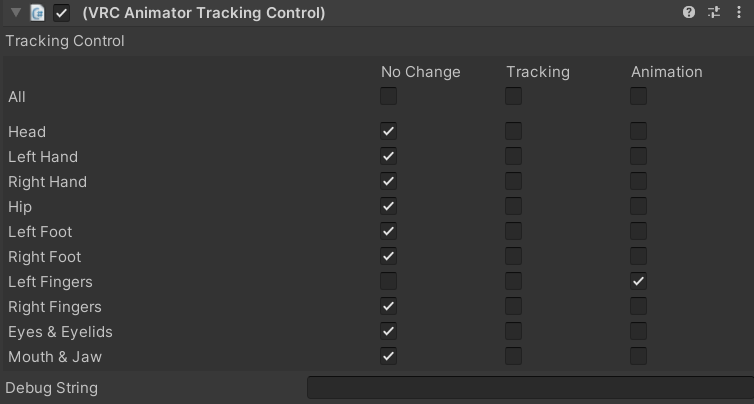
Section titled “TrackingType”The active gesture state automatically adds a VRCAnimatorTrackingControl behavior.
| Value | Description |
|---|---|
Tracking | Keeps VRChat finger tracking active while the gesture runs. |
Animation | Disables tracking so the animation fully controls the fingers. |
IntroAnimation
Section titled “IntroAnimation”IntroAnimation is optional. It plays once when entering the dynamic gesture state from a standard VRChat gesture.
Use it when a custom gesture needs a short transition before the main gesture loop takes over.
- Assign it per incoming VRChat gesture when needed.
- Use it for more natural transitions before the main gesture animation begins.